Share the boba. Share the love.
Give bobas to teammates. Redeem for stickers. Send even more boba.

lilian9:31 AM
@junjie 🧋🧋 no notes on that demo, you carried
clay9:34 AM
@jennie 🧋 lmaooo
paul9:36 AM
@lisa 🧋🧋🧋 redid the onboarding docs and they actually make sense now
How it works
Give a boba
Drop a 🧋 on a teammate in
#boba. Everyone gets fresh bobas every day.# boba · 6 memberslilian 9:31 AM@junjie 🧋🧋 no notes on that demo, you carriedclay 9:34 AM@jennie 🧋 lmaooopaul 9:36 AM@lisa 🧋🧋🧋 redid the onboarding docs and they actually make sense nowOpen a mystery box
Type
/bobatab-stickerin Slack and spend your bobas on a pack. You will not know what is in it until it opens.Opening…
See what you got
3 random stickers, opened without leaving Slack.
You got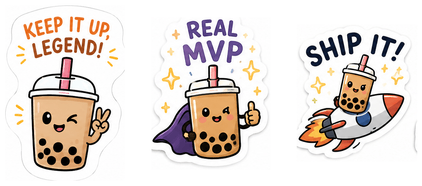
You got: Keep It Up, Legend · Real MVP · Ship It
Saved to your stickers. Send them whenever.
Send one to someone
It posts in the channel with their name on it. Everyone you name gets a boba too.
# boba · 6 membersBobaTabApp 2:07 PM@clay sent a 🧋 to @justin, @sarah, and @mikeready for launch — thanks for the hard work this week
Boba buys stickers
Because sometimes a boba isn't enough.




Frequently asked questions
What does BobaTab read?
Only #boba — the one channel it creates at install. Not your other channels, and not DMs. Messages containing a boba are stored with their text so each bit of recognition has a reason attached; everything else is processed and discarded. The full detail is in the privacy policy.
Can bobas buy anything besides stickers?
Not today. Stickers are the whole economy.
How much does it cost?
Free!
Why does :boba: show up as plain text?
It still counts — the give is recorded either way, because BobaTab reads what you typed rather than what Slack drew. It just will not render as a picture unless your workspace has an emoji by that name: Slack's built-in one is :bubble_tea:, and :boba: is not standard. Add it at Customize emoji — as an alias for bubble_tea, or upload your own. Typing 🧋 always works.
How long does setup take?
About a minute, and there is nothing to configure. Installing creates #boba — or joins the one you already have — invites you, and starts watching it. Invite the team and you are giving. Balances survive an uninstall, so you can reinstall later without losing anyone's history.